Working in Healthcare IT

Part of the appeal of working in IT is that there should be a constant stiving to learn and excel. Programming and technology depends on being cutting-edge, staying ahead of the curve. As someone who works at Symantec once told me: ‘Technology is an arms race – you’ve got to do it better than all the other guys out there.’ Of course, Symantec is security software, so his view may be a little more militaristic than, say, a data analyst.

Anyways, I digress. Another part of the allure is that IT is in huge demand: the job market is booming, and I don’t really forsee a time where humanity will have automated our business and medical processes enough to step away and leave the computer systems in the hands of the machines. The Transhuman Singularity isn’t here, and the need for technical specialists is only accelerating. What I do see as a threat includes outsourcing software and hardware development, viruses such as Stuxnet (broad-reaching, networking-crippling, ‘contagion’-style viruses), and having a lack of well-trained technical staff. It is fairly easy to earn a degree from DeVry university, even in Computer Science, but what is it really worth? Grads from Carnegie Mellon and MIT are regularly offered 80k-100k once they matriculate, but with college, reputation counts as much or more than grades – unless you are attending graduate school, it hardly matters whether you were a A+ or a B- student.

Healthcare IT is a curious spot to be in, because we exist in an economic bubble, but it is a bubble that is pushing the job market higher. Due to Federal regulations (Medicare reimbursements vs. mandatory medical record system implementation), almost every major hospital system in the nation, along with a majority of the smaller players, is revolutionizing their medical practices by introducing an electronic medical record system (EMR). This means that unemployment for healthcare IT specialists is currently, and will remain, fairly low.

A word of caution – I don’t know whether the push to establish all these health informatics college majors and graduate programs is a good idea, overall. While I see the employment field as robust, I fear that the health informatics programs may just be an educational bubble – someone is probably better majoring in information systems or computer science, instead of focusing on merely one sub-set. The same can be said for computer security degrees. Narrowing down too tightly before graduation will unduly hamper your career options after college.

Our department’s CEO showed us a slide (I don’t have it currently), with the national averages for unemployment, vs. the technical field. National unemployment averages around 8.x% (it varies by the month). Information technology (as a whole) hovers around the low 4.x%, while healthcare IT clocks in at a remarkably low 2.x%. When the implementation bubble decompresses, I expect that the unemployment rate will rise to around the national technical average (4.x%), but healthcare IT will remain a strong contender for at least 5-10 more years.

Posted in Careers And Work, Information Technology, Wordplay and Commentary | Tagged , , , , , , , , , , , , , , , , , | Leave a comment

Free Online Public Data Sources: An Annotated Bibliography

Free Online Health Data Sources: An Annotated Bibliography

By William Murakami-Brundage

1st edition, February 2012

There exists a shortage of usable data sets and public health data. Whether your interest is biomedical engineering, health informatics, data mining, or public health analysis, this annotated bibliography should contain something that will aid your search for knowledge. It is my pleasure to compile this resource for you, and I hope that you find it as useful as I have during my work as a health informaticist and data scientist. Thank you for using this research in your work, and I wish you the best on your data endeavors.

For this first edition, this bibliography is compiled alphabetically. As things progress and this work grows, it can be certain that a different shape will emerge. At the same time, the basic concept still holds true: keep it simple. If you are looking for a database, data set, visualization tool, or government health data fact, you can probably find it within one of these data sets. Please feel free to write me at http://velluminformation.com with any specific data requests or questions, and I will be happy to aid you if possible.

An Annotated Bibliography: Free Online Health Data Sources

  1. caBIG Knowledge Center: https://wiki.nci.nih.gov/display/cabigkcwikis/Knowledge+Centers

The caBIG Knowledge Center is a databank hosted by the National Cancer Institute. Under its umbrella are a wiki, a forum, and a whole host of databanks. These include: caGrid Knowledge Center, Clinical Trials Management Systems Knowledge Center, Data Sharing and Intellectual Capital Knowledge Center, Imaging Knowledge Center, Molecular Analysis Tools Knowledge Center, Tissue/Biospecimen Banking and Technology Tools Knowledge Center, Vocabulary Knowledge Center, and the Development Code Repository, a Subversion server dedicated to knowledge center development code.

2.  Centers for Disease Control: http://www.cdc.gov/DataStatistics/

This repository includes data and statistics via topic, including: Aging, blood disorders, cancer, chronic diseases, deaths, diabetes, genomics, growth charts, heart disease, immunizations, life expectancy, MRSA, oral health, overweight & obesity, physical inactivity, reproductive health, smoking & tobacco, STDs, vital signs, and the workplace.

3.  Centers for Medicare and Medicaid Services, Data Compendium: http://www.cms.gov/DataCompendium/

“The CMS Center for Strategic Planning produces an annual CMS Data Compendium to provide key statistics about CMS programs and national health care expenditures. The CMS Data Compendium contains historic, current, and projected data on Medicare enrollment and Medicaid recipients, expenditures, and utilization. Data pertaining to budget, administrative and operating costs, individual income, financing, and health care providers and suppliers are also included. National health expenditure data not specific to the Medicare or Medicaid programs is also included making the CMS Data Compendium one of the most comprehensive sources of information available on U.S. health care finance. This CMS report is published annually in electronic form and is available for each year from 2002 through present.”

4.  Community Health Profile:  National Aggregate of Urban Indian Health Organization Service Areas, December 2011: http://www.uihi.org/wp-content/uploads/2011/12/Combined-UIHO-CHP_Final.pdf

This report contains statistical data for the Urban Indian Health Institute’s research: topics include sociodemographics, mortality, access to care, alcohol use, and environmental, heart, mental, and maternal/child health. Compiled from the national service areas located within the USA.

5.  Data.ed.gov: http://data.ed.gov/

Includes data tools and data sets: for example, Fiscal data for public schools and universities, common data core sets, educational progress and primary/postsecondary data. Data sets include legal data, Federal resources, and trends in science and mathematics for students. Data sets are in a variety of formats, XML, CSV, and XLS.

6.  Data.gov: http://www.data.gov/health

“You’ve found a public resource designed to bring together high-value datasets, tools, and applications using data about health and health care to support your need for better knowledge and to help you to solve problems. These datasets and tools have been gathered from agencies across the Federal government with the goal of improving health for all Americans. Check back frequently because the site will be updated as more datasets and tools become available”

Key elements include a massive index of health data sets: Medicare, geographic data, medical record system adoption, child welfare, and assisted reproduction data. There is a health apps repository/demo site, and a small collection of other data sources that bears looking at, especially for 1. California’s health data, and 2. The Gallup Poll Well-Being Index.

7.  Educational Data Partnership, California’s K-12 Schools: http://www.ed-data.k12.ca.us/Pages/Home.aspx

Data for all of California’s public school system, by State, County, District, and school. Also includes reports, teacher salaries, and data about charter schools.

8.  FastStats A to Z: http://www.cdc.gov/nchs/fastats/default.htm

FastStats has data for any illness or major life complication that could arise for a citizen of the USA. A small sample includes: American Indian or Alaskan Native health, assault/homicide, cancer, deaths/mortality, emergency department visits, immunizations, kidney disease, life expectancy, marriage, Mexican American health, obesity/overweight, pertussis, smoking, and teen pregnancy. If it is a life-changing event, chances are good that FastStats has at least basic data for it.

9.  Federal Government IT Dashboard: http://www.itdashboard.gov/

“The IT Dashboard is a website enabling federal agencies, industry, the general public and other stakeholders to view details of federal information technology investments. The purpose of the Dashboard is to provide information on the effectiveness of government IT programs and to support decisions regarding the investment and management of resources. The Dashboard is now being used by the Administration and Congress to make budget and policy decisions.

Importantly, there are analysis tools and data feeds, not quite a data set. Also, the source code is available for the IT Dashboard.

10.  Health and Human Services Open Data Initiative: http://www.hhs.gov/open/

Includes details for mHealth Initiative, Startup America, and health data competitions. Also includes data about executive orders and records and reports.

11.  Health Indicators Warehouse: http://www.healthindicators.gov/

The Health Indicators Warehouse has data sets sorted by topic, geography, and initiative. Example data sets include: Chronic Diseases, Disabilities, Health Care, County data, Community Health Data Indicators, and CMS Community Indicators. Also, data sets are available for all 50 states and Washington, D.C.

12.  HealthyPeople 2020: http://www.healthypeople.gov/2020/default.aspx

The Healthy People 2020 Initiative is dedicated to creating a health environment for everyone, and contains data and publications that strive to meet this goal. It has a specific focus on health disparities and prevention efforts.

13.  Justice Department’s Open Data Initiative: http://www.justice.gov/open/data.html

”Publishing high-value datasets that increase accountability and responsiveness improve public knowledge of the Department of Justice and our operations, create economic opportunity, and respond to need and demands of the public are a core component of our efforts to fulfill The Open Government Directive”

Data sets available include jail data for numerous years, antitrust cases, jail census data, law enforcement data, forensic unit funding, state and Federal correctional facility data, Chapter 7 filing, Freedom of Information filings, hate crime statistics, and prosecutor data.

14.  Many Eyes: http://www-958.ibm.com/software/data/cognos/manyeyes/

Donated data sets, combined with an information visualization application, creates real-time displays from an almost endless supply of data. Everything from average Canadian household expenses, to London’s air quality, to Kobe Bryant’s game scoring, and quite a bit in between. Also, the application is relatively simple to use, which means that any given data set can be visualized with little effort.

15.  Massachusetts Open Data Initiative, Data Catalog: https://wiki.state.ma.us/confluence/display/data/Data+Catalog

A huge repository of open data sets from the state of Massachusetts: economic, education, geography, health, population, public safety, and technology are all covered, as well as quite a few other subjects.

16.  National Cancer Institute: http://www.cancer.gov/statistics/tools

Statistical tools and data: SEER data, SEER*Stat software, health disparities calculator, Medicare-linked database, and analytic software. Also includes a bank of statistical methods for cancer, cancer survival, and geographic information systems.

17.  National Center for Health Statistics: http://www.cdc.gov/nchs/

“Welcome to the National Center for Health Statistics’ website, a rich source of information about America’s health. As the Nation’s principal health statistics agency, we compile statistical information to guide actions and policies to improve the health of our people. We are a unique public resource for health information – a critical element of public health and health policy.”Data covers: diseases, health care and coverage, injuries, life stages, populations, lifestyle factors, and more.

18.  New York City’s Open Data Initiative: http://nycopendata.socrata.com/

Open data sets for everything from subway data to open-access WiFi networks, park maps, SAT scores, and filming locations. Too much of a hodge-podge of data sets to really define – besides the key element that everything is related to New York, there is no strict boundary or catalog.

19.  Open Data Initiative: http://www.opendatainitiative.org/

“The Open Data Initiative is a Web 2.0 site for disseminating public data.”Includes visualize data sets for suburb safety, Australian criminology tracking, and the Saudi Arabian census. May bear further watching, or may be transitory.

20.  Open Government Data Initiative, The: http://ogdisdk.cloudapp.net/

“The Open Government Data Initiative (OGDI) is an initiative led by Microsoft Public Sector Developer Evangelism team. OGDI uses the Windows Azure Platform to make it easier to publish and use a wide variety of public data from government agencies. OGDI is also a free, open source ‘starter kit’ with code that can be used to publish data on the Internet in a Web-friendly format with easy-to-use, open API’s. OGDI-based web API’s can be accessed from a variety of client technologies such as Silverlight, Flash, JavaScript, PHP, Python, Ruby, mapping web sites, etc.”

Hosted by Microsoft’s Cloud App servers, this data initiative displays visualized data sets and has a section for data developers as well.

21.  Regulations.gov: http://www.regulations.gov/#!home

Database and compendium of government regulations and laws.

22.  VitalStats: http://www.cdc.gov/nchs/VitalStats.htm

VitalStats includes data sets for: births, deaths, perinatal mortality, and other public use data files related to vital statistics and their usage in the USA.

23.  World Bank Data: http://data.worldbank.org/

This is the motherload of all data banks. Provides access to over 7,000 indicators for global statistics, including economic, health, education, and environmental; by country, year, and topic. Also has a microdata library.

Posted in Digital Libraries, Education, Information Technology, Resource-a-rama, The Cloud | Tagged , , , , , , , , , , | 1 Comment

What Does a Data Analyst Do?

What does a data analyst do?

As a data analyst, someone typically handles data coming from or going into a data warehouse or business intelligence system. They compile the reports, verify the quality (integrity), and use the data to assist executive- and senior-level staff to make informed company decisions. The work can also include information visualization, statistics, and/or database application design, depending on the needs of the organization.

Examples of data warehouses (possibly) include Salesforce, SQL Server 2008, Oracle 11i, and mySQL. These relational database management systems (RDMS) are custom-built specifically for organizations. The logic and programming for even a small database requires expert knowledge, and large ones can require many months and extensive planning. Data analysts often have some formal background in database logic, relational algebra/calculus, and programming, and assist the database developer in constructing a solid schema for the relational database.

When it comes to data, a huge part of the data analyst’s job includes programming in the computer language known as Structured Query Language (SQL). Each database system has its own varient or flavor of SQL, but there are basic rules with SQL that apply across the board. Many newer technologies include Hadoop, data warehousing, and Big Data analysis, which are at the cutting-edge of the data-science world in 2011.

There are some evolutionary changes in data science – for instance, data mining has become a standard strategy for uncovering patterns. Data mining is heavily reliant on algorithms and statistical methods, which are used by applications such as RapidMiner, Weka, and/or R (the mathematics program), in order to discover knowledge.

In order to be a data analyst, it is almost always mandatory to have at least some college background. It is a rigorous field, much as any computer science-based occupation. Solid knowledge of current data techniques is vital, and being willing to continually upgrade and train for new skills and developments is also imperative. Having a background in mathemathics, computer science/information systems, statistics, finance, or economics will be a benefit; graduate school is also an option, and can assist with advancement.

Posted in Careers And Work, Education, Information Technology | Tagged , , , , , , , , , , , , , , , , , , | 4 Comments

Academic Experiences in Computer Information Systems: Associate vs. Graduate Education

 I had the chance to catch up with my brother-in-law over the weekend, and cross-compare notes about our educational paths. I am finishing my Masters in Information Systems (MSIS), and he is half of the way through his Associates in Computer IS at Portland Community College in Oregon. I am attending Drexel via online courses, and he is attending a hybrid online/in-class program at his local community college.I felt that there was an opportunity to give a perspective about IT programs, especially CIS, at the undergrad and graduate levels – so I interviewed him and have added relevant material from my experience at Drexel. I hope that it is useful, and perhaps can help guide readers in case they decide to embark into the IT realm.

Regarding the reasoning that the two of us returned to school as non-traditional (older) students:

Brother-in-law: “I originally started taking classes part-time in the fall of 2010. In January, 2011, I was let go from my job and school seemed like the most best option, especially considering the state of the economy. Fortunately, the employment dept. has an option for education that allows a person to go to school while collecting unemployment benefits, so long as they are in an approved program and you maintain a certain GPA.”

Personally, I knew that I wanted to attend graduate school, and went into my undergrad with this intent. At the same time, the fact that he was eligible for retraining is a definite boon – since he is capable, I think that it is making the best of what could have been a problematic experience.

Why major in computer information systems (CIS):

Him: “Computer Information Systems was actually my 3rd choice after Medical Lab Tech and Electronic Engineering Tech. The MLT program was already full, and EET didn’t seem to be as lucrative as I would prefer. CIS is flexible enough that I can tailor my classes to focus on a particular part of CIS, in my case databases.”

Myself: Information Systems was almost an afterthought – I decided that I wanted to continue pursuing my education. Really, I should have approached things from an even longer-term viewpoint and began my PhD program. This is ultimately where I see myself heading. As far as career options, I looked around at what my friends were doing, and realized that 1. computers and technology had the growth, and 2. I really like technology and development.

Time in the classroom and stress management:

Him: “Each week I spend approximately 7 hours in the classroom, plus 20 or more working from home. Ultimately, I am doing homework 7 days a week. I typically try to take regular breaks throughout the day. This may include reading fiction, video games, going for a walk.”

From my perspective: I am doing work 7 days a week, every day of the week. Typically work involves 1-2 hours a day from Monday-Thursday, 2-4 hours on Friday, and typically 12-16 hours spread out over the weekend. This can go up when I am working on a research project – these numbers are probably the low end of my time commitment. Since I work a 40-hour, full-time job, my school/research/work week is probably 80 hours.

You can really see the difference in time commitments between the Associates and Masters-level academic work. Beyond that, the actual technology requirements tend to be a little different. Two-year programs develop skill sets, and eventually move into requirements analysis, system design and architecture, and software engineering. Business methods and management is part of the MSIS, but typical PhD programs are much more involved with research and development (the applied vs. theoretical debate that is shown in the Masters vs. PhD coursework).

Posted in Careers And Work, Education, Information Technology | Tagged , , , , , , , , , , , , , , , , , , , , , | Leave a comment

The ‘Drunken Master’: A Prototype Case-Based Reasoning System

NEDB 2012 Poster, code-named the Drunken MasterThis shows the system that I have been working on. It extracts the data from an API feed, parses it and cleans it, and then feeds it into Protege, at which point a case-based reasoning system is built around the specifics. While it currently extracts web products and compares on a collection of critical data categories, the system can be created with any structured or semi-structured data set. The more structured, the easier the data extraction process – the data must be immaculate in order to go into the case-based reasoning system.

I don’t know why I called it the Drunken Master, except that it sounds like a cool code-name. If anyone is interested in working together on this, please feel free to write me!

Posted in Information Technology, Resource-a-rama, The Cloud | Tagged , , , , , , , , | Leave a comment

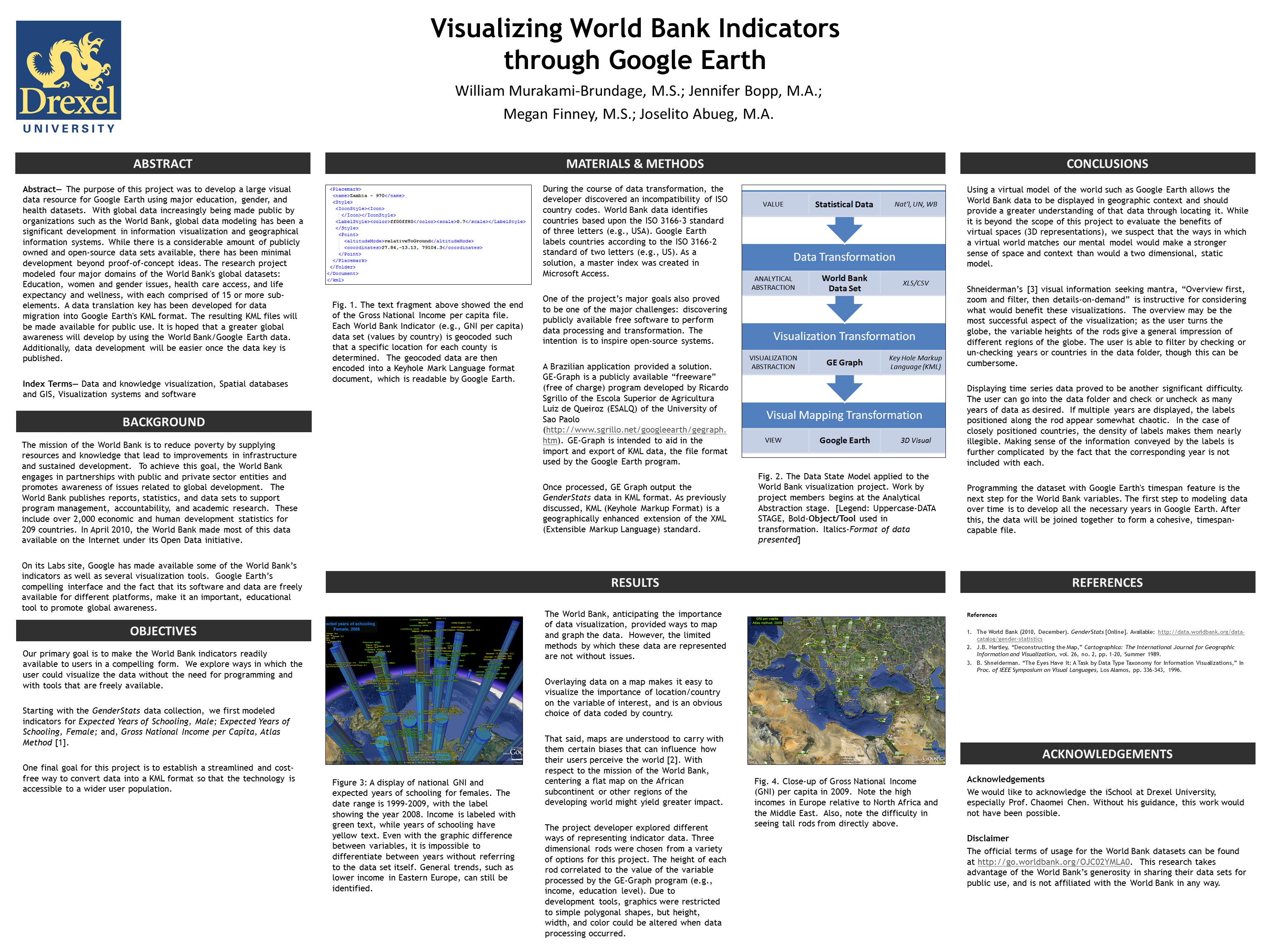
Visualizing World Bank Indicators: Research Poster

Image

At this point, I kind of forget where my research is going, and also where it has been. Anyways, I will send this out on the Internetz for anyone whom is interested. It is the corresponding presentation to the KML files that you can find in the previous blog entry.

This poster was part of the 10th Annual Hawaii International Social Science Conference, held in Waikiki, Hawaii. At the time, I was working on coursework for Drexel’s Masters of Information Systems program – I think the course this stems from was Prof. Chaomai Chen’s Information Visualization (INFO 633). While I have reservations about Drexel’s administration, for the most part the faculty are both productive and scholarly.

Take a look, have a fun time with it. If you have any comments, feel free to drop me a line!

Posted in Education, Information Technology, The Cloud | Tagged , , , , , , , , , , | 1 Comment

Google Earth, World Bank Data, and KML Files

I thought that I would make available the KML files that I created for several categories of World Bank data indicators. Please note that the data was available only due to the kindness of the World Bank’s open information initiative that was undertaken a few years back.

Please download and use the attached KML files, stored in the ZIP file attached to this post. You will need Google Earth to properly view the KML output. The methodology for creation was tedious, but the end results were worth the time and effort.

Also, please see my and my colleagues’ paper: Visualizing World Bank Indicators Using Google Earth. An earlier draft is available on Google Scholar, and you can find it via Drexel’s digital repository as well.

I have made a copy of the KML file available for download from Google Docs, and have started a project on good ol’ SourceForge.

Look for the KML file here: https://docs.google.com/open?id=0B5yaEXyAId60NTA0YjBhOTItMzkzMi00NzA2LTg1NDMtZmFjMjJjN2JlYmQ4.

Also, see the SourceForge link to the project here: https://sourceforge.net/projects/googleworldbank/.

Posted in Information Technology, Media Sharing, Resource-a-rama | Tagged , , , , , , , , | 7 Comments

Leveling Up in IT

What is the difference between a junior and senior position? One pat answer is $20,000. If you are going into IT, a huge question is probably ‘how do I get to the top of my field?’ Well, IT has a few unique characteristics that make it a place where advancement happens quickly. For example, most IT staff do not spend more than five or six years before becoming a senior-level staff person (at least if they remain in the same field), and the average is probably closer to three years. This is also further verified by Glassdoor.com, Dice, and Monster, as well as Payscale and other career planning websites. It must be duly noted that IT has a rapid progression, as the demand for skilled staff is greater than the supply, and probably will remain so. Companies are often desperate to find and retain technical staff, and job titles such as ‘Senior Software Engineer‘ help to soothe the ego…

Junior IT staff typically have no experience in the field, or perhaps one year at most. They are considered just above interns in capacity, and typically require a fair amount of hand-holding, especially during the initial phases of the career. Straight out of college, junior staff usually have just graduated. Sometimes junior personnel don’t have formal training from college, but come in due to knowing how to do the task at hand (i.e. programming, database design, mobile app development, etc.) When it comes to IT, think of the Wild West, not the Federal Government – things happen quickly, change is a given, and skill often counts more than a degree.

‘Regular’ IT staff (noted by the lack of a junior or senior designation), are still in the trenches, and rank in there with the average IT person. They usually have been working in the field for at least one year, but less than five. Promotion to a senior position usually occurs within three or four years, especially since there is an entire career field (the IT recruiter) that specializes in recruiting skilled staff for competitive organizations. If you don’t give your staff the promotion they deserve, someone else will – it is almost a given. Hence, the rapid rise.

As a note, I come from a library background. This is a typical government position in that people will work for years before being promoted to an actual librarian, even if they have the graduate education required. The IT field is absolutely the opposite of this. Take note, future librarians.

Senior staff typically have over three years of experience, and often over five. They are next in line to become project managers, program directors, or department heads. Often, it is an especially savvy senior IT person whom gets put in charge of those do-or-die projects. Someone can technically remain a senior staff person for many years, but promotions still occur, and fairly regularly. This is an important point, and cannot be overlooked: Senior staff almost always have a college degree, and often going past the senior staff level requires at least a bachelor’s degree, if not a graduate degree. This is the point at which education starts to really pay off – not a couple of years out, but a decade from the start of your career.

For career changers, there can be a few roadblocks – many IT companies prefer to hire young. Don’t let ageism get the best of you, because it does happen. There are companies that are renown for hiring at 22 and laying off at 40 – but even if you are 55, there are still career options out there. Retaining the capacity for self-learning and internal motivation are critical for achieving the upper levels of the IT career path – I have never met a successful senior- or executive-level IT person whom was mentally stagnate or lazy. Be prepared to bring your mental focus to the forefront of your work, every day.

Posted in Careers And Work, Education, Information Technology | Tagged , , , , , , , | Leave a comment

Transitioning Careers into the Technical Realm

When I was in high school, I intended to be a .com boomster, and ride the digital era into that $1m jackpot. After I graduated from the illustrious Churchill High School, I went to community college and studied for a few terms – and then dropped out and stayed out for 5 years.

During that time I worked for several social service agencies, volunteered at the local library, peddled goods at a Spencer’s Gifts, designed web pages, did odd job hardware repair, and generally fiddled around. Eventually I ended up settling on case management for five years, working with people with severe mental illness. If you want to learn how the mental health system works, try case management. I have a sneaking suspicion that many doctors have little to no idea about how the health system actually works on a day-to-day level.

Then I returned to college, finished my Bachelor’s, attended Drexel for my Masters, and went back for a second MS in Information Systems. At this point I am 2/3 of the way through, and am going to take a few months off so I can push through the last of the academic doldrums and be done with the MSIS.

Importantly, I transitioned careers. This is something that the USA is forcing people to do – retrain, regroup, and reorient for a new career. It is in the news every day, about new fields and opportunities. Newspapers are dying, but social media is hot. There is so much data that we are drowning in it. Severe IT shortages are leaving companies desperate for skilled staff. All of this while factories are shuttering and entire cities are devoid of the traditional work that has sustained the American way of life for decades.

First, a caveat: If you want to retrain, make sure that you have the capacity that you will need. Computer science isn’t easy, and will never be simple. Too many people get desperate for a good-paying career, and sink instead of swim. If you are bad at mathemathics, study before you even attempt college. A huge bulk of the students at my community college couldn’t grasp advanced algebra, and hence never graduated. It was depressing, and showed me that the educational system was failing our students in a gross and negligant way.

Transitioning is difficult. My Masters is in Library Science, and libraries have become a new target for budget cuts – but thankfully the skill set transfers well into other fields. Do your research on the Bureau of Labor Statistics website, as well as Glassdoor.com, Monster, Dice, and any other place you can get a good, unbiased workplace opinion. Read about your over-arching field and your options for three or four months before deciding on your short list of possible careers. Even within IT, there are differences and sub-domains – the array is wide.

I am not going to say that IT is the only option – but to be honest, technical skills are your only option. The USA doesn’t need more fashion designers, and you will be back to starving if you pick liberal arts or English. Learn math, learn science, study the technical fields. Grasp how to write, firmly and completely.

The world has become the Shifting Land, and keeping on your feet is like riding the hurricane wind. It has also become a world where intellectually, technically, and skill-wise, ‘those who can’ have become ‘those who have’, in many senses. Yes, the technical world is hard, but the unemployment rate for IT is far lower than it is for people with only a high school education, or even college grads in non-technical fields.

There will be no going back to a simpler era, and William Gibson’s cyberscapes becomes more real every day. We have a barreling bull before us as a people and as a nation, and the only way out is to grasp both horns and ride our challenge. Don’t be trampled by the hooves of the world.

Posted in Careers And Work, Education, Wordplay and Commentary | Tagged , , , , , , , | 2 Comments

Digital Libraries, Content, and Structure

Digital libraries are a major element in the formation of the Internet. For those of you whom don’t remember, originally the Internet just had these index pages full of links, with little rhyme or reason to them – this was before the days of Google and the web-crawling spiders, the Open Archives Initiative, and the .com boom. It was a rough era back in 1995.

Taken in Philadelphia, Pennsylvania, in April ...

Image via Wikipedia

Anyways, I digress. Digital libraries and repositories exist in a vaccuum of sorts – they aren’t considered actual libraries, but are desired as fonts of knowledge. For instance, most digital libraries are attached to actual institutions like universities or government organizations. Yet, in my thinking there must be a place for independent digital libraries, curated by librarians as a ‘Free Digital Library‘, much in the spirit of Benjamin Franklin’s ventures of founding the great ideas such as the University of Pennsylvania and the libraries of Philadelphia.

I am curious about how many of these places actually exist, and how their collections are managed. One issue that I have encountered is collection development – finding free resources is critical for a starting collection. As a librarian, I am aware of fair use and copyright, and really understand and appreciate the work that it takes to create a written text. Anyone whom has tried writing knows that it isn’t easy, and proper attribution is critical – as is earning income (if that is a goal).

Overall, the cost of developing a good library system has dropped dramatically due to systems such as Greenstone and Fedora Repository. These are highly based on the traditional library template. At the same time, I see a digital library based on Drupal or Joomla! to be more innovative and bear bigger fruit, as the CMS systems can incorporate a wider variety of media, allow video playback, and create a more immersive library experience. Importantly, the major CMS systems also adapt to mobile easily, which reduces the overhead of mobile site development to a fraction of what it could be.

I doubt I am the first to take this approach to library development, but think that it can be a great tool for information freedom and the dissemination of knowledge. Typically, libraries have a focus or act as a type of special collection. The primary portion of the work is in collection development, which is why I mentioned it earlier – there is a broad difference between ordering books online and finding relevant sources online, contacting their creator, and attaining permission to include them in the library. This is a whole different strata of work, more like a curator of a museum. It requires approaching organizations and institutions, rather than just a sweeping Amazon purchase – so far, it hasn’t needed content negotiations. I will know the day of official recognition has come when someone offers to sponsor a digital library in return for naming rights…

Posted in Digital Libraries, Education, Information Technology, Wordplay and Commentary | Tagged , , , , , , , , | Leave a comment